Case studyScripps NetworksMedia
Rebuilding a newspaper-era CMS, and the roles that would run it
In 2007, Scripps Networks published HGTV, Food Network, and DIY Network online through FastForward, a content management system built for newspapers, just as Google search, blogs, and tagging were changing how people found content. Brought in by the CTO to redesign the system, I led a dotmatrix studios team through research, vision, and design, and the work became an operating model for publishing: which roles the business needed, and how they would work together. Over two years the engagement expanded from one consultant to a distributed team, until the 2008 recession ended it.
- Client
- Scripps Networks, publisher of HGTV, Food Network, and DIY Network online
- My role
- Principal Designer, dotmatrix studios
- When
- 2007 to 2009
- Team
- Five of us at dotmatrix studios, working remotely, plus a Scripps designer embedded with us
- Engaged by
- Chief Technology Officer
Results
The engagement
- 1 → 6people on the project, from a solo consultant to a distributed team of five plus an embedded Scripps designer, as Scripps widened the scope after each playback
- 7primary personas, modeled from interviews and observation across editorial, design, engineering, product, ad sales, search, and SEO
Scripps signed off on the research and design, and engineering began to build. The 2008 recession ended the engagement, and the project was shut down after we left.
The client
Scripps Networks grew out of a newspaper and media company, and its online brands ran on FastForward, a CMS originally designed to serve a newspaper in the early days of the web. By 2007, the web had moved on. Google drove the vast majority of page traffic, people searched more than they browsed, and millions of bloggers were tagging their own content with better tools than Scripps editors had.
The good news was the brands themselves. With established on-air audiences driving traffic, Scripps was in a strong position to capture both loyal readers and searchers, if its editors could publish for the web as it now worked.
The problem
FastForward was full of dead features from the newspaper business, and missing the ones the web demanded. The issues that hurt productivity and content quality most:
- No true previewDesigners and editors couldn’t see content as it would appear in production
- No image previewsFinding the right image could take three times the effort it should
- Search ignored metadataAnd most assets lacked structured metadata to search on
- Hard-coded modulesLink lists, images, and blurbs on landing pages lived in HTML, so changing them took a team of three content engineers
- Tagging was a choreThe brand taxonomy appeared as a flat list in cryptic terms, with no memory of tags already applied
- Everyone had a wish listGranting every feature request would produce a system that served everyone and no one
What I did
My strategy was to design for the people who used the system, modeled explicitly, not for a list of feature requests, and to bring the tagging and metadata patterns of the blogging world inside the company, so every article could be found by search and related to others across the brands.
In practice, that meant:
- Talk to everyone who touches the system. Interview and observe every role in publishing, from editors to ad sales.
- Model the roles, then play them back. Turn research into personas and scenarios the business could recognize and sign off on.
- Set principles before features. Decide what the system was for before deciding what it did.
- Let topics earn their place. Turn tags into pages, and let performance decide which topics rise into the brand’s navigation.
- Start each editor’s day with her own work. Lead with drafts, schedules, and performance, not a menu of tools.
- Make tagging part of writing. Put metadata, assets, and controlled vocabulary in the flow of publishing an article.
- Build from reusable relationships. Let editors pull guests, companies, and products into a show page instead of retyping them.
I was the product manager in all but title: the liaison to the business and owner of the client relationship, the researcher, and the author of the strategy and vision. I modeled the personas and scenarios, did some of the interaction design and wireframing, and directed David Reid’s interaction design and Tina Roth Eisenberg’s visual design, while mentoring the designers on the team.
Track one
Understanding the roles
From interviews to personas, scenarios, principles, and a model for the brands’ taxonomies, played back to Scripps for sign-off at each step.
Talk to everyone who touches the system
The research plan was simple to state: interview every person who currently touched the CMS, and everyone who might touch it in an optimal publishing process. We traveled to Scripps’ studios in New York, and often to Knoxville, to interview and observe them at work.
In all, I interviewed or observed five designers, five editors, two content engineers, six core brand teams, two network senior vice presidents, the ad sales group, the search team, and the SEO team. The range mattered. Ad sales needed sponsorship codes to follow content from a package page to its articles. SEO wanted to bless page structure before launch without becoming a bottleneck. Neither need would have surfaced in interviews with editors alone.
Model the roles, then play them back
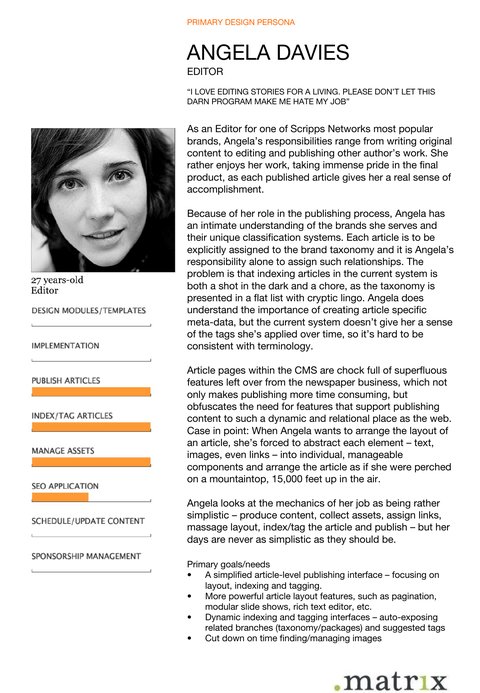
From that research, I modeled seven primary personas: an editor, a product manager, a content engineer, an ad sales lead, an SEO specialist, a designer, and a library scientist, with secondary personas for freelance staff. Each one carried the goals and frustrations we heard in the field. Angela, the editor, put it plainly: “I love editing stories for a living. Please don’t let this darn program make me hate my job.” She was responsible for assigning every article to the brand taxonomy, in a system that showed it as a flat list of cryptic terms.
Then I wrote context scenarios for each persona, a day of work in the future system, as the bridge from research to interface. I presented the personas and scenarios back to the business and got sign-off before we moved on. Every playback earned more scope.
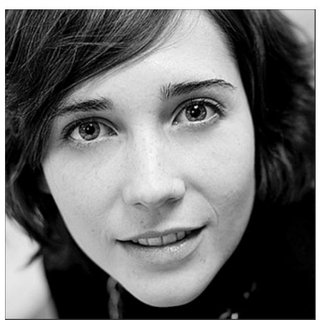 Angela DaviesEditor
I love editing stories for a living. Please don’t let this darn program make me hate my job.
1 context scenario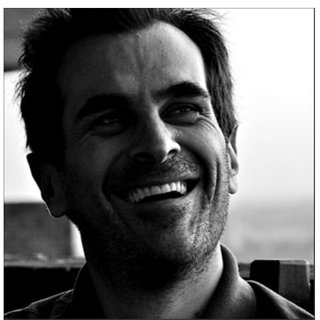 Jeff PolinskyProduct manager
Let’s get beyond stickiness and shoot for community.
3 context scenarios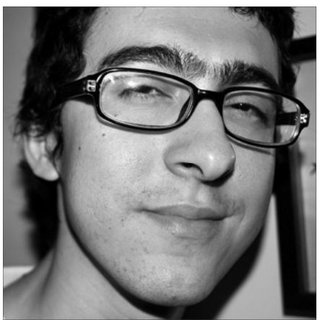 Scott McBrideClient-side developer
The presentation layer isn’t child’s play.
2 context scenarios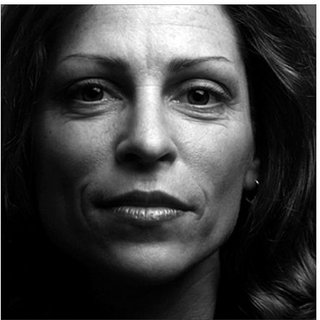 Barbara JonesAd sales
We need to support our current business model, first and foremost.
2 context scenarios David MimsSearch engine optimization
Language is what separates us from each other.
1 context scenario Sarah LuanWeb designer
A better user experience makes a better brand.
3 context scenarios Jennifer StewartLibrary science
You focus on the content; I’ll get meta about it.
2 context scenarios- Secondary personas
Freelance staff: a designer, a writer, and a content engineer, each with narrower access to the same system.
Read across, the roles barely overlap. The editor lives in publishing, tagging, and assets. Ad sales lives in sponsorship, the developer in implementation, the product manager in scheduling. One system, seven different jobs. That variability was the case for designing around modeled roles, and the reason a single feature wish list would have failed.
The personas weren’t a map of the org chart, either. No one had asked me to define roles, but talking to everyone in the publishing process showed which tasks the business needed done, and who, if anyone, owned them. Some roles existed. Some didn’t: people were doing SEO, but no one’s job was SEO, and the library scientist who would maintain the taxonomy was a new role altogether. Others would change. Once content was decoupled from code, client-side developers could stop maintaining landing pages and focus on their real work. The CMS came with an operating model: who would work in it, and how they would work together.
| Persona | Templates | Implementation | Publishing | Tagging | Assets | SEO | Scheduling | Sponsorship |
|---|---|---|---|---|---|---|---|---|
| Angela DaviesEditor | Primary | Primary | Primary | Some | ||||
| Jeff PolinskyProduct manager | Some | Some | Primary | |||||
| Scott McBrideDeveloper | Primary | |||||||
| Barbara JonesAd sales | Primary | |||||||
| David MimsSEO | Primary | |||||||
| Sarah LuanDesigner | Primary | Some | ||||||
| Jennifer StewartLibrary science | Primary | Some |
Primary responsibilitySome involvement
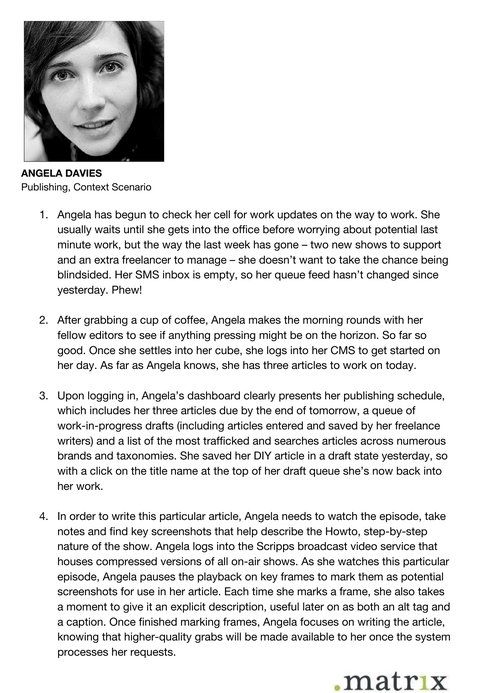
Angela was the primary persona, and her pages show the depth behind each card:
Set principles before features
The vision opened with a warning: “The biggest mistake with a new CMS would be for us to attempt to grant every feature wish out of the gate.” The first release would focus on each role’s key paths, and later releases would take on edge cases as new research came in. Three principles set the direction:
- Simplify and reduce. The essential mechanisms already existed; the presentation was the problem. Eliminate cognitive friction, and where a feature mattered to one role and not another, use permissions instead of clutter.
- Enable discovery and dynamic relationships. Give editors tagging tools at least as good as a blogger’s, so modules of related articles would truly relate, and so Scripps could expose relationships across its brands.
- Decouple code from content and styling. Turn hard-coded modules into modules with admin screens, so brand teams could schedule changes themselves and content engineers could focus on harder problems.
Let topics earn their place
Tagging only pays off if tags become pages people can find. In January 2008, I designed how each brand’s taxonomy would manage itself: any tag could earn a topic page, and topics would rise or fall on how they performed.
Brand sections stayed nearly fixed, because replacing one meant repositioning the brand. Beneath them, editors’ tags built the long tail automatically. Performance decided what moved up: how much content was being tagged, editorial momentum, and the advertising value of the keyword. The product manager, Jeff in our personas, promoted topics that were breaking out and demoted ones that stalled, and could take any topic from automatic to hand-managed when it was worth the attention.
Brand sectionsGlobal navigation · managed
Nearly evergreen. Replacing one means replacing its subsections, a repositioning of the brand, so these controls are used sparingly.
Featured topicsGlobal navigation · managed
UpT3 and T2 topics that outperform the navigation. DownStagnant ones make way.
T3 · Vertical topicsTopic page · managed
UpA topic’s advertising value reaches the level of a vertical. DownEditorial drive or keyword value fades.
T2 · Transitional topicsTopic page · managed or automatic
The hinge of the taxonomy. UpA T1 with consistent growth in tagged content. DownContent stops being tagged, or the page underperforms.
T1 · Long-tail topicsTopic page · automatic
Created automatically once three pieces of content carry the tag. From there, one way to go: up.
Global navigation, a hierarchyTopic page, managed by handTopic page, generated automaticallyLarger means more visible and more valuable
The model joined three things that usually live apart: editors’ tagging, search, and advertising. A topic that began as three tagged articles could grow into a curated, sponsorable page, and eventually a place in the brand’s navigation, without a site redesign. The brand kept its shape while the long tail evolved beneath it.
Track two
Designing the system
From key path scenarios to wireframes, functional specifications, and visual design.
Start each editor’s day with her own work
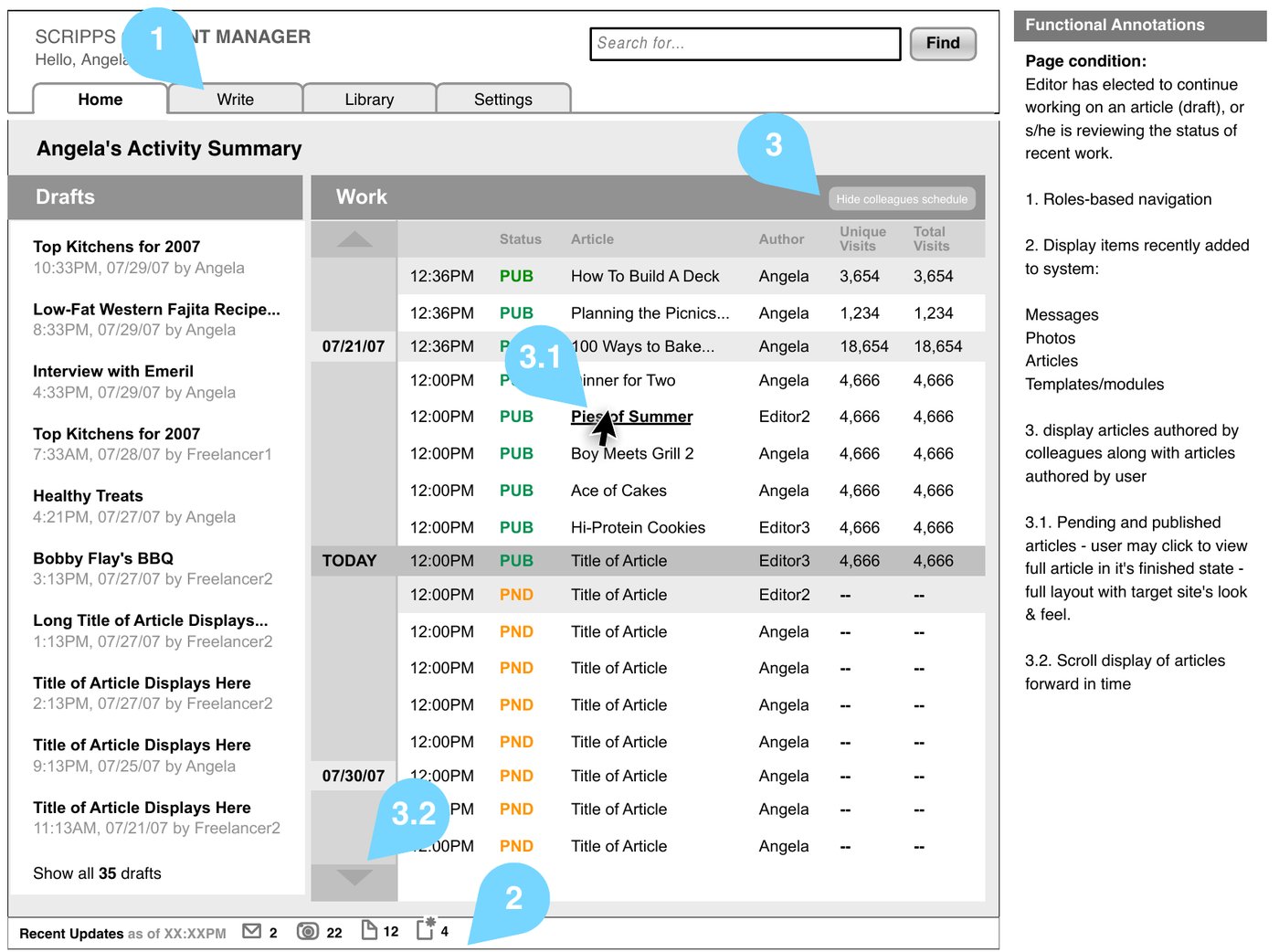
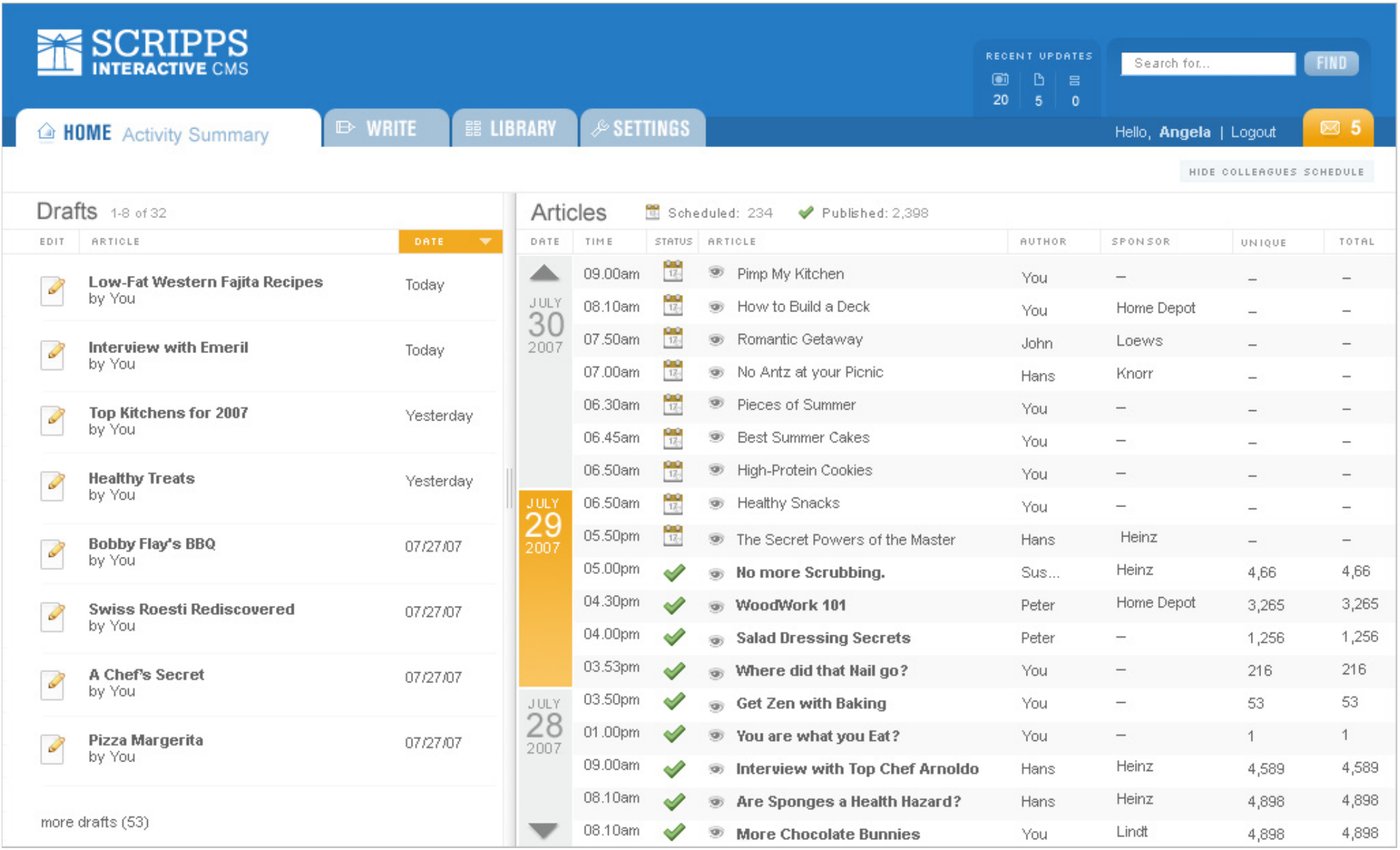
In Angela’s scenario, logging in showed her publishing schedule, her drafts, including those saved by her freelance writers, and how articles were performing. The dashboard made that literal. Her most recent drafts sat in one pane. The other showed what had been published and scheduled around today, with author, sponsor, and unique and total visits, and a switch between her own articles and everyone’s. Messages, such as a page ready for review, arrived without leaving the screen.
David Reid’s wireframes and functional annotations defined the behavior, and Tina Roth Eisenberg’s visual design followed two weeks later.
Make tagging part of writing
Tagging was the heart of my vision. The blogging world had shown what simple, consistent metadata could do for findability, and editors needed that power inside the CMS, without losing the brands’ taxonomies.
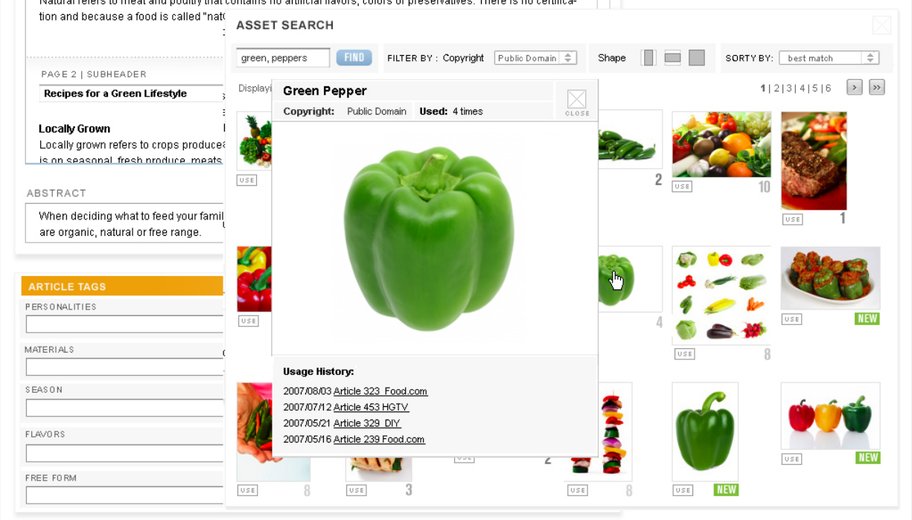
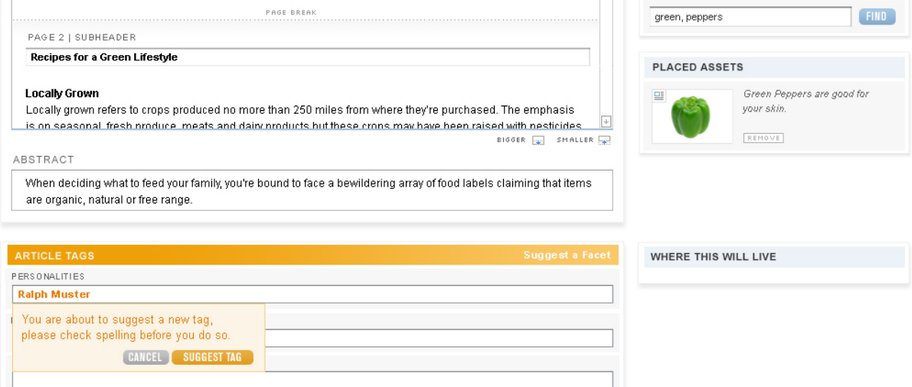
The publish screen, told as a 19-step storyboard, put it in the flow of writing. Angela searches assets for “green, peppers,” filters to public domain images, and sees how often each one has been used, and on which brands, before placing it. When she tags the article, the field suggests matches from the controlled vocabulary as she types. If she enters a tag the system doesn’t know, it asks her to check the spelling before submitting it for review, so new tags could grow the vocabulary without fragmenting it.
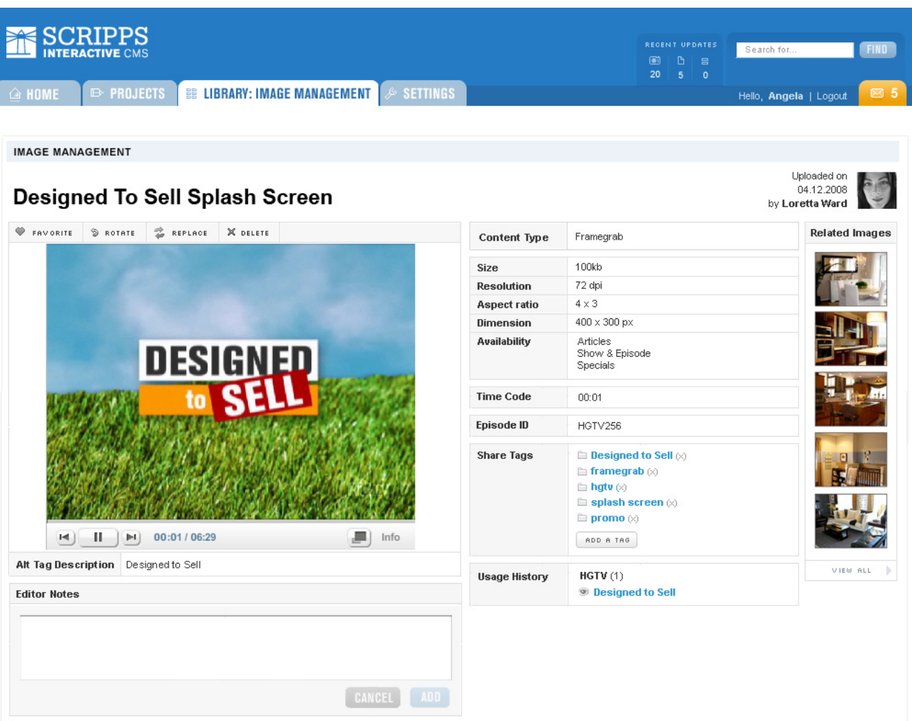
The scenarios kept paying off as the work went on. In Angela’s publishing scenario, she pauses an episode on key frames and describes each one as she marks it, so the description can serve as alt text and a caption later. The image management screens, designed in August 2008, made that real: a frame grab carries its time code, episode, where it can be used, its tags, and its usage history.
Build show pages from reusable relationships
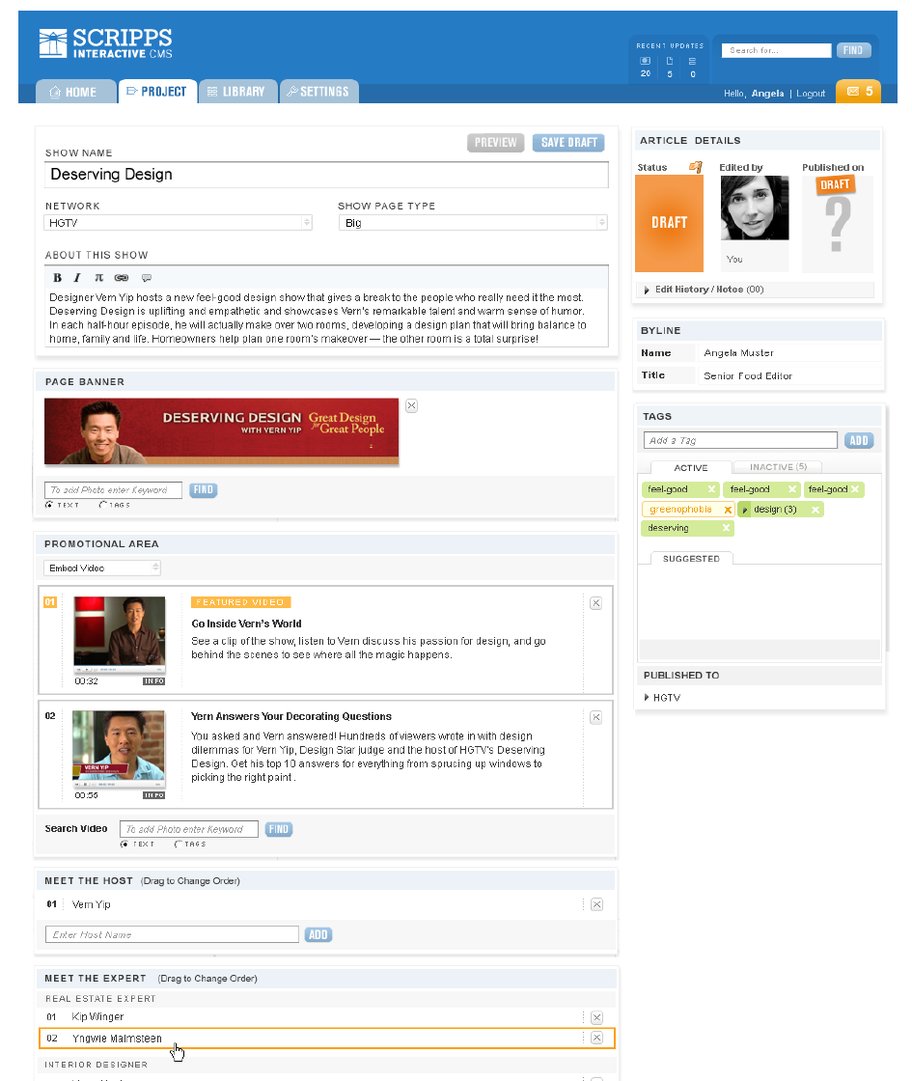
Every show had a page to build: the host, the experts, promotional video, related content, sponsorships, tags, and search fields. Much of what appeared on a show came from advertisers through product placement, and the same guests, companies, products, and books turned up again and again.
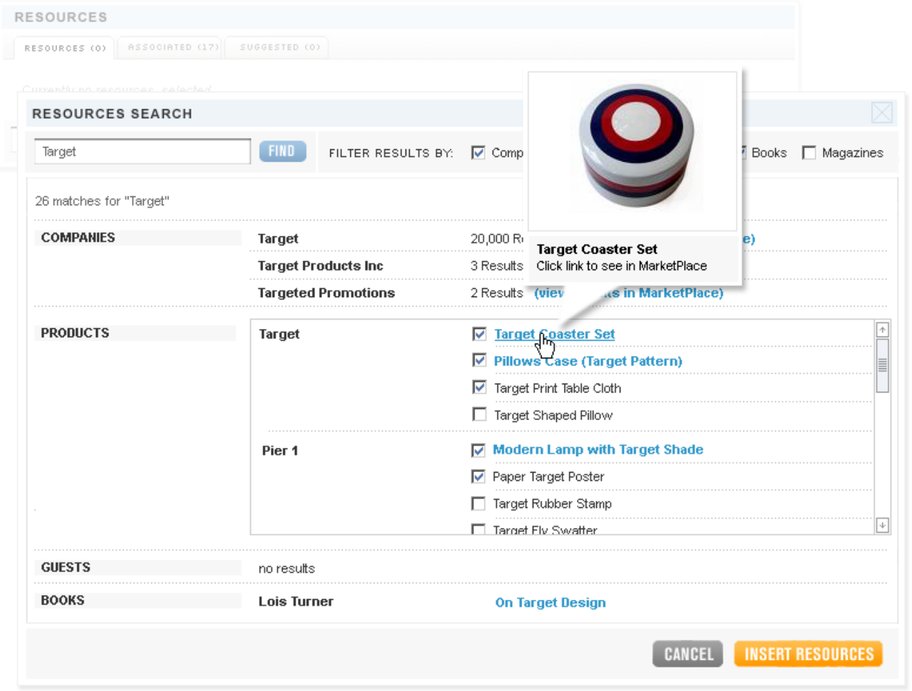
So we made them resources: objects in the system, related to each other, such as a company and its products, or a guest and their book. An editor could search for one, see everything related to it, and insert what the show needed. Adding a new company suggested matches already in the system, company details from a third-party feed stayed locked, and products could be reordered by dragging. Instead of retyping the same relationships for every episode, editors grabbed them and built the page.
How we worked
We embedded in Scripps’ agile process, with daily stand-ups, while the studio team worked from across the country. That was remote design work well before it was common.
Usually, consultants embed in the in-house team. Here it ran the other way: Billy Davenport, a Scripps designer, joined my team because he needed a mentor. He became our conduit into the business and into Scripps’ own design team.
The artifacts trace how far the work went. The dashboard wireframes date from August 2007, the research document reached version 1.6 that November, the long tail model followed in January 2008, and the show page, image management, and resource screens ran through August 2008.
What happened
The more we researched, modeled, and played back to the business, the more room we were given. What began as one consultant billing by the hour became a distributed team of senior designers, and the largest engagement in dotmatrix studios’ history.
Scripps used the deliverables, and engineering began to build. But while we built alignment with the business, engineering worked toward its own idea of the right platform, and the two drifted apart. Then the 2008 recession hit, and Scripps’ priorities shifted. After we left, the project was shut down. I don’t believe it was ever built as designed.
Key learnings
- Playbacks build the mandate.Every time we played research back to Scripps, as personas, scenarios, or principles, the business saw itself in the work and gave us more scope. Research that stays in a document earns nothing. Research people recognize themselves in earns trust, and trust earns room.
- Design the operating model, not just the tool.No one asked me to define roles. But mapping every publishing task to the people who did it, or should, showed that a new CMS would change the jobs around it: some created, some sharpened, some freed to focus on their real work. Designing the system without the roles would have rebuilt the old workflow in new screens.
- Alignment with the business isn’t alignment with engineering.I spent my time building value with the business while engineering built toward its own vision of the platform. Both efforts were moving; they weren’t moving together. Today I’d bring engineering leads into the playbacks from the start, so the scenarios were theirs too.
- A sponsor gives cover, not ownership.The CTO, whom I’d worked with at TheStreet.com, brought us in and gave the work cover, but he was hands-off. Cover protects work while it’s being made. Ownership is what carries it through a downturn, and when the recession came, no one inside Scripps owned the outcome.
Questions about this project? Email me.